
[Notice] Outerplane Web Store — Now Open

Dear Masters,
The official OUTERPLANE Web Store is now open as of May 20, 2026!
📍 Visit the Official Webshop
https://webshop.outerplane.vagames.co.kr/shop
1) How to Purchase and Receive Items
(1) Tap the [Event] icon on the left side of the Lobby > Tap [Event Hub] from the banner > Tap the [Web Store Open!] banner
(2) Log in with your existing method (Google / Apple / Email)
(3) Confirm your server and account in the top right
Make sure the selected server matches the server of the account you’re currently using.
(4) Select the item you’d like to purchase, choose a payment method, and complete your order. ,
(5) Purchased items will be sent to the [Mailbox] > [Item] tab of the linked account.
2) Available Items
(1) Web Store Launch Special
Web Store Launch Special items are structured as a step-up bundle.
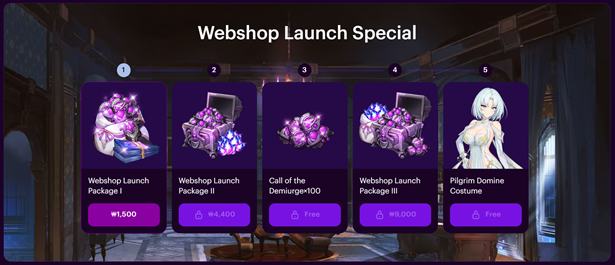
| Step | Item Name | Item(s) Included | Qty |
| 1 | Launch Celebration Package I | Call of the Demiurge | 100 |
| Special Recruitment Ticket | 10 | ||
| 2 | Launch Celebration Package II | Ether (Paid) | 500 |
| Call of the Demiurge | 100 | ||
| 3 | 100x Call of the Demiurge | Call of the Demiurge | 100 |
| 4 | Launch Celebration Package III | Ether (Paid) | 1,000 |
| Call of the Demiurge | 200 | ||
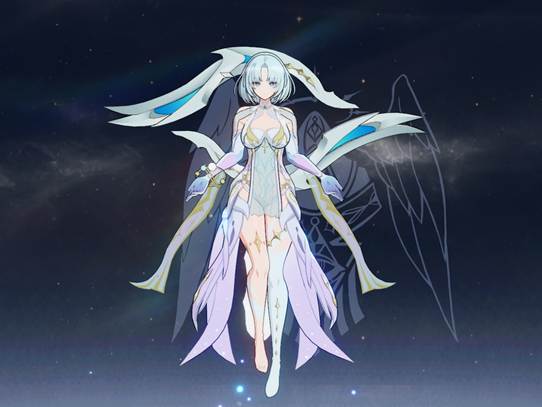
| 5 | Pilgrim Domine Costume | Pilgrim Domina | 1 |
[Pilgrim Domine Costume Preview]
- Package
| Item Name | Item(s) Included | Qty |
| Ether Bundle I | Ether (Paid) | 1,000 |
| Ether (Free) | 500 | |
| Ether Bundle II | Ether (Paid) | 1,500 |
| Ether (Free) | 1,200 | |
| Ether Bundle III | Ether (Paid) | 4,000 |
| Ether (Free) | 2,500 | |
| Ether Bundle IV | Ether (Paid) | 8,000 |
| Ether (Free) | 4,000 | |
| Gear Booster Pack | High-Precision Control Chip | 3 |
| Refinement Reset Scroll [Legendary] | 4 | |
| Transtone (Individual) | 30 | |
| Transtone (All) | 50 | |
| Gold | 20,000,000 | |
| Effecton | 150,000 |
[Important Notice]
– Please verify the account that will receive the items before completing your purchase.
– Payments in unsupported currencies will be charged in USD.
– Web Store purchases may not be available in certain countries or regions.
– For limited-time items, the sale period may not be displayed separately — please take note when purchasing.
– Refund policies are the same as those applied to the existing in-game store.
– For limited-time items, the sale period may not be displayed separately — please take note when purchasing. Once the sale period ends, purchases and item retrieval will no longer be available.
– The Web Store will be inaccessible during maintenance.
– For in-game item delivery issues, contact OUTERPLANE Customer Support. For payment-related inquiries, submit a request via the link below.
– Item Delivery Issues: https://outerplane.helpshift.com/hc/en/4-outerplane/
– Payment Inquiries: https://help.xsolla.com/en
We hope you enjoy the newly opened Web Store!
Thank you.